Open source HR tools / Office forms

In the company I work for, it is common practice for them to send me .doc files to use as forms for administrative functions. They are often created as templates and then when when the purpose of the form is triggered then a .doc is sent as an attachment in an email. In today’s modern age this process seems relatively inefficient in terms of man hours involved for several reasons:

  1. Some admin person has to create the form.
  2. I have to fill it out and send it back.
  3. In order for the information to be used more than once the information has to be taken out of the form and inserted into a database of some kind.

It also seems irresponsible use of bandwidth and harddrive space when one considers:

  • The email sent the first time takes up bandwidth, and harddrive space in the sent box and received box.
  • The form is likely to be saved in a folder related to the project it is needed for, and then possibly saved again after it is completed.
  • The Completed form is likely to be sent back to the first person sending the request form and then possibly several other people.

It seems a lot more efficient to create a web based application on a company LAN/WAN and then have the employee fill out the application there and give the (all) admin personnel needing the info access to the completed info and have the data displayed as a form. – simple. Except in our industry there are two obvious difficulties which need to be overcome:

  • How does the admin person create the web based form?
  • How does the company supply off-line access to employees for filling out the form?

As for the second point I am not sure that I have an answer. But concerning the first point, .doc files are probably used because that is what is easy to use and .doc / word processing is a tool which is familiar to the admin person.
The question I am asking is, is there an open source LAMP app which lets one create forms for office processes which lets users (admin personnel) quickly and easily create and deploy forms? It would also be nice for the fields to pull from the same database when practical. i.e. The office needs to create two forms. Both require the employee filling out the form to put their name in the form and the names of the people to whom they are sending the form. Because the employee logged into the LAN/WAN then the form should auto propagate with the name of the logged in user. However, if it didn’t then it should be prompted when the employee starts filling out the form “Autocomplete style” and the suggestions for names should come from the corporation central database of employee names. The end goal is that the admin person should be able to click button and activate a widget in the form and the widget should behave the someway, relating data or relating to data sources across different forms created for the office.

Some OpenSource Projects I found through a Google Search but have not tried:
http://www.orangehrm.com/download.php
http://www.openhris.com/
http://www.kineoopensource.com/index.php/role/hr/
http://www.joobsbox.com/
http://www.jobdigtracker.com/
http://www.webresourcesdepot.com/open-source-job-board-application-joobsbox/

http://www.toplev.com/OfficeForms.html

Zoho Office
http://labnol.blogspot.com/2007/07/create-web-forms-with-zoho-creator.html

Plugins not used…

In the early days of WordPress (2005) and WP-plugins there was usually only one plugin to do the job. Today there are many. So the task comes to sorting out which plugins are the right ones for the job and which ones are the best.

PDF viewing on site
I have been looking for a solution for giving my visitor the option to view PDFs I create on my site without having to download the PDF.

  • Third Party Services
    • iPaper
      There is a service for this called Scribd.com. They use a technology called iPaper to present your material. As best I can tell, you upload your document and then they convert it to flash and present your content as flash in a custom flash viewer. It works great. There is also a WordPress plugin to pull your hosted content to your WordPress website. Actually there are two plugins at the time of my writing iPaper and Simpler iPaper. I found that iPaper was the easier plugin to work with.
    • GoogleDocs
      If you are into using GoogleDocs then there is a plugin for presenting GoogleDocs in the same way as documents submitted to Scribd.com. It is called Google Doc Embedder.
    • embedit.in
      Embedit.in is another snazzy third party service. I have not tried it but it seems to work well and has some built in analytics for seeing who downloads your document.
    • docstoc.com
      Docstoc.com is yet anther third party service for serving documents.This review pits it and scribid.com against embedit.in
    • Zoho
      Zoho Apps is a rival service to Google Docs, they have a viewer for the files which users create with their online apps or add to their services. So if you are using an office document work flow which uses Zoho Apps you can embed these with ease with viewer. According to this review, Zoho Viewer lets users do three things:

      1. view documents
      2. share document as URLs
      3. embed documents
      4. .

  • Self-Hosted and Self-Contained
    • Self-Hosted SWF
      However, in general, I do not like using third party services, after a while I forget what content I have in “the cloud” and I like to keep as small a digital footprint as possible. So I found a third solution. There is a plugin called WordPressPDF. This one requires that you convert your PDF files to SWF files and then presents them on your site without requiring a third party service. It did require the installation of swftools to do the PDF to SWF conversion. However this seems a small price to pay for leaving a smaller digital foot print.
    • A second solution that I found in use was to use http://www.fpdf.org/ which is a PHP class to view PDFs the technical skill required to implement it was beyond my current time to develop. There was also another viewer mentioned here. with it’s code on Google Code but I could not figure out how to download the whole set of files out of Google Code.

Keeping track of “To Dos”
There are so many cool things you can do with web pages and with WordPress. I needed a way to track all the things that I wanted to do. I have tried three plugins for this.

  • Admin Notes ajax jquery
    The first, Admin Notes ajax jquery, added a blue box at the top of all my admin pages to which I could add “To Do” items however this increased the load time of my admin pages by at least 3 seconds under heavy use. So it had to go.
  • WordPress Admin Notepad Plugin
    The second, WordPress Admin Notepad Plugin, added a single “scratch paper” spot through the settings tab. This was not accessible enough. It seems more ideal for passing notes between users on a WordPress install.
  • Peter’s Post Notes
    The third, Peter’s Post Notes, Is the winner! is by far the best plugin for my uses because it keeps track of notes on a per page or per post basis. So I only see the notes which are relevant to the current post.
  • Note Pad
    A long time ago, I also used Chris Davis’s Note Pad plugin it allowed me to make a note in the admin area and then easily change it to a post draft. I could not get this plugin to work with a current version of WordPress.

Stats

Get people to view your site with a browser other than Internet Explorer.

Again there are several plugins. They take two different approaches one is Pro-FireFox (from spreadfirefox.com), the others are anti-IE6.

This is a really sensitive, but serious issue. As a web-developer I do not want people using a browser that is less secure than a modern browser like Firefox 3.5.3+. However, there is another reason to encourage a browser other than IE, and that is I don’t want to have to recode each page in an IE friendly manner. This is just too much work.

  • Spread Firefox
    The spreadfirefox plugin got annoying because it showed it’s logo all the time even when viewed in FireFox and it created a huge footer.. So I yanked it.
  • IE Warning
    The IE Warning plugin was a bit friendlier and had a really cool custom panel where I could customize the CSS applying to the warning.
  • Shockingly Big IE6 Warning
    But in the end I went with the Shockingly Big IE6 Warning because it had the best admin panel and the most customization options.
  • Anti IE6 Army
    Anti IE6 Army was not tested but appears to be a plugin of similar function.

How do you keep a page from showing up in the menu?

http://wordpress.org/support/topic/229889
http://wordpress.org/support/topic/220508
Plugins:

Aussois

In the summer of 2009 I went to the 11th ICAL to present a paper, An Unlikely Retention. We stayed at the Centre Paul Langevine in Aussois, France, outside of a National Park – “Parc National de la Vanoise”. Absolutely a beautiful place. See my pictures here.

Centre Paul Langevine

Centre Paul Langevine

[mappress mapid=”1″ autocenter=”true”] Growing up in Southern Germany, I can say that I am familiar with alpine culture. But this was my first real taste of french alpine food. – And it was really good.
There was Cheese:
Cheeses

Cheeses

Reblochon was a winner.
Tamié was good.
When I got back to the U.S. I wen to the store to see what kinds of Cheeses I could find. Among the ones I could find were Beaufort and Gruyère. There are several other cheeses which I was not able to find at my Local Whole Foods: Tomme de Savoie and Tome des Bauges.

Tomme de Savoie

Tomme de Savoie

The Tomme de Savoie is made year round and tastes different depending on what the cows eat. It makes me miss the smells of the high-alpine meadows; even if they make me sneeze and have allergies.

Cheeses alone do not constitute a whole meal (though I might try). One dinner we had was exceptional: Tartiflette, It was like a thick fondu with potatoes and bacon. High in fats and full of flavor.

Tartiflette

Tartiflette

Wine: There was wine… served with every meal but breakfast. Red wines hurt my gums and I guess I have a weak constitution, ’cause they really don’t help my digestion.

Language:
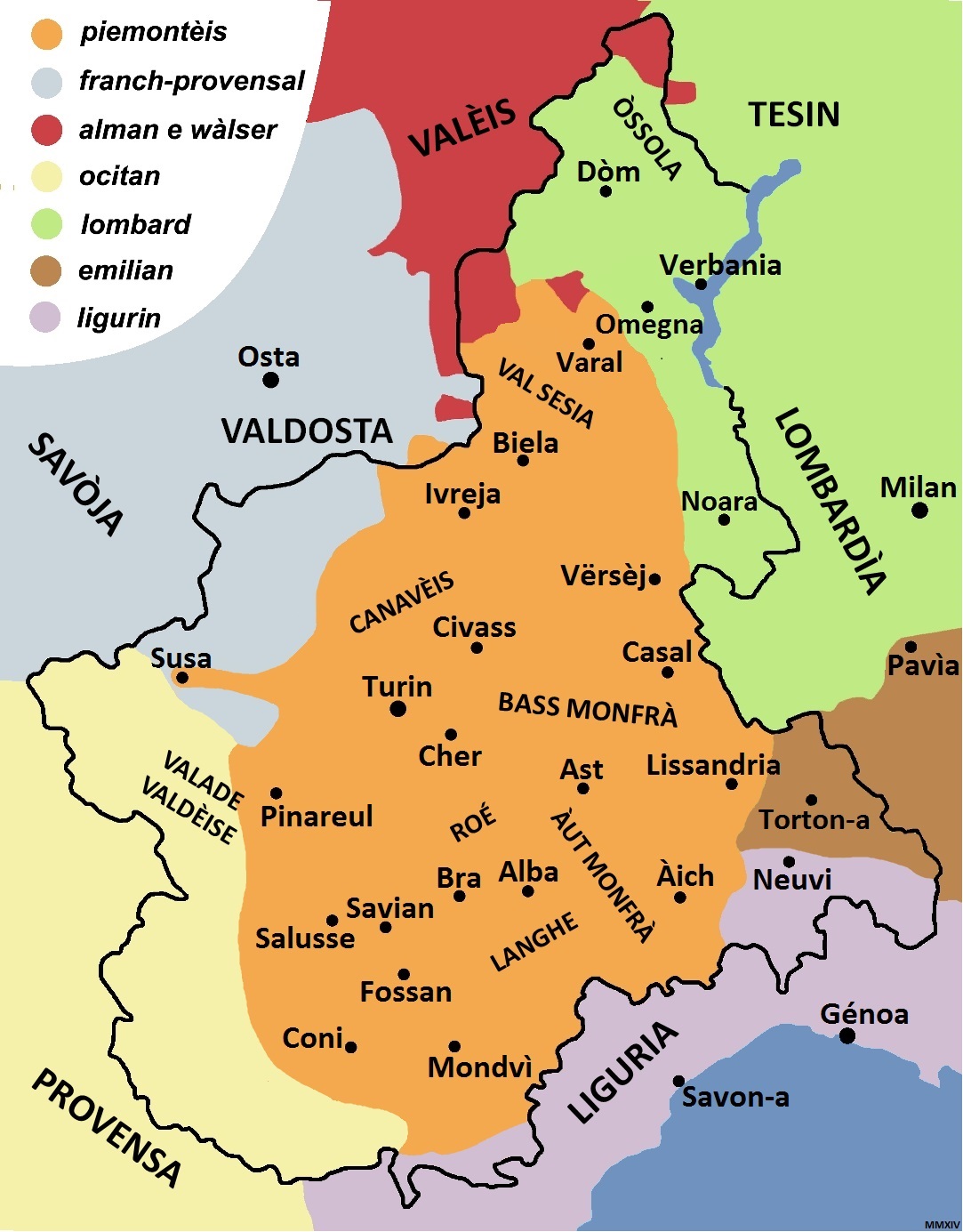
One of the interesting things of the Savoie region is that it used to be independent, it also used to be part of Italy. So it has a rich lingusitic heritage with respect to how it represents itself dialectically. As I understand the linguistic situation Piedmontese is the dialect, which is a sub-part of the Franco-Provençal languages.

Linguistic Map of Piemontèis

Linguistic Map of Piemontèis

Photos are from: Hugh Paterson III, Mike Pangilinan (via FaceBook 11th ICAL group), Loren Billings (via FaceBook 11th ICAL group), and Wikipedia. For more of My Photos check out the Gallery.

Lasting Linguistics: Making a Meaningful Mark

John Clifton, Steve Marlett, and Hugh’s materials can be downloaded below:

The keynote presentations:

Hugh’s files have the title: Acadmic forum [sic] View it: Online
Or download it as: PDF, QuickTime, or as a Keynote file.

Steve’s files have the title: MakingItLast2
View it: Online
Or download it as: PDF, QuickTime, or as a PowerPoint file.

ut-ma’in PhD idea

Research idea for gel - PhD????

Use DDP for dictionary development project, use data to explore semantic distinctions of noun classes

run a DDP workshop for Nig Group

Invite gel, dud, dri and others to participate - could do comparative analysis of noun class semantic distinctions of the three closely related languages.

Plenty of data, compare to semantic domain classification of Ron Moe's work

Keith mentioned semantic analysis as topic for Dissertation following the description I did for MA @ UND

Larin interested in overlap of grammar and semantics... when do the semantics of the noun class over rule "universals"? ID semantic lines visible by division of nouns into classes

Outcomes - start of dictionary for multiple related languages

Issues - who would process all that data??????Does Nig Group have a Lexicography specialist?

What would SOAS think of this in terms of language documentation

Online and digital tools

To – Do

1. Portfolio

Enter

3. Contact Managment System

4. Customer Manament System

5. Set up Website

5a. WordPress

Development

SIL Development

Missionary needs

XML output for WBT statements

Quicken input for WBT statements

MySQL/Php version of Donor Manager with connection to web interphase.

5b. PhpBB

5c. Wikimedia

5d.Gallery2

5e. Family Tree

5.f loudbot- Loudblog

5.g Php Syntax Trees

5.h Listserv / Mailing list

5.j Auto vCard creator

5.k iAddressbook

5.l PHP iCalendar

5.m GPS

6. Bento Data Base

7. FilemakerPro